When the Display Hides a Detail the Camera Captured
A reduced control-room tile can hide detail that remains in the camera frame. A reversible viewing-scale comparison helps separate this presentation effect from changed streams, optics or installation hardware.
Download the article (PDF)PDF · 894 KB

A smaller window can look like a softer lens
A camera’s image can reach the control room with its fine detail intact, yet show too little of that detail for the operator’s task. The change may be as ordinary as displaying nine views where the bench setup displayed one. The lens has not necessarily changed; the image has been reduced again after capture.
Consider a commissioning exercise using a narrow white reference stripe beside a service-gate latch. The stripe is easy to locate in a full-size bench view. In the proposed operating layout, the whole gate is recognisable but the stripe is difficult to distinguish. That observation raises a question about the complete image path. It does not identify a defective camera.
Before adjusting focus, preserve a frame from the installed stream at its original decoded dimensions. Decoding turns the received video into image pixels; the viewer then maps those pixels into a window. A screenshot of a small tile records the result of that mapping, so it cannot show which detail existed beforehand.
This boundary gives the investigation a useful first decision. If the stripe is already absent in the original frame, shrinking the display cannot be the only explanation. If it is present, the team can investigate presentation without disturbing the optical setup.
Inventra S³ describes its test and qualification capabilities, including environmental testing and dimensional inspection. Site acceptance adds the installed user task. NASA’s systems engineering guidance similarly treats validation as evidence that the integrated system serves its intended use in its intended environment. For this exercise, the relevant environment includes the operator’s actual screen layout.
Keep evidence from before display scaling as well as from the operator’s screen.
How smaller views lose fine detail
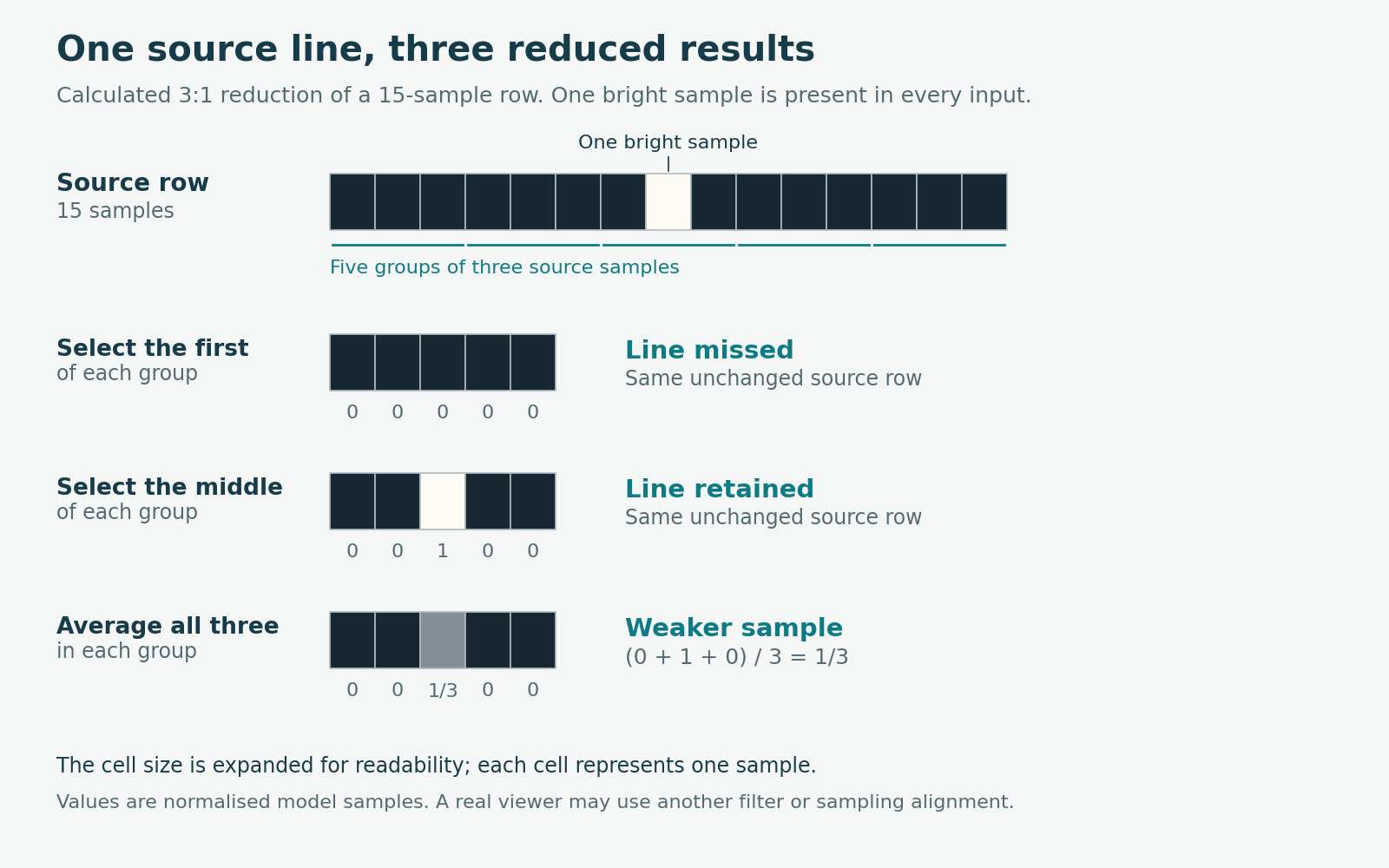
Assume a decoded frame is 1,920 × 1,080 pixels. Reducing it to a 640 × 360 image uses one-third as many samples in each direction and one-ninth as many overall: 230,400 instead of 2,073,600. Borders, menus and unused screen space are excluded from these assumed image dimensions.
A stripe six source pixels wide then spans only two output pixels geometrically. That is a useful scale calculation, not a guarantee that an operator can distinguish it. The result also depends on the stripe’s contrast, its position relative to the new sample grid and the reduction method.
A smaller example makes the problem visible. Take a row of fifteen samples, all dark except one bright sample. Reduce it to five samples by choosing the first member of each group of three. If the bright sample falls between the chosen positions, the output contains no bright sample. Choose the middle member instead and the line may survive. The source row has not changed.
Alternatively, average each group of three. A group containing values 0, 1 and 0 produces (0 + 1 + 0) / 3 = 1/3. The narrow line contributes a weaker sample instead of a full-height one. This is a simple arithmetic model, not a prediction of a particular viewer’s brightness response.
MIT’s downsampling chapter explains why reducing resolution loses fine detail and why filtering reduces misleading sampling patterns. Filtering cannot preserve every original feature at the smaller size. The CSS image-rendering specification also leaves substantial choice to the browser. A scaling label alone does not identify the exact algorithm or prove the required detail survives.
Change the scale, then return to the starting view
The clean comparison starts with one unchanged decoded frame. Export it without resizing or additional lossy compression, and retain that original file. Use a still-frame or replay mode in the installed viewer that can hold this exact image while changing its display scale. Confirm that resizing does not retrieve a different frame or switch sources.
Set up three observations on the same workstation and monitor:
- A — original scale. Display a crop containing the stripe, with one source pixel mapped to one physical screen pixel. Record the crop position and what is visible.
- B — reduced view. Keep the same frame and renderer, but display the full image at the intended tile size. Record the stripe’s appearance and the actual image area.
- A again. Restore the original mapping and crop. Check whether the stripe returns to its previous appearance.
Keep sharpening, colour settings, monitor settings, room lighting and viewing distance unchanged. Do not refocus the camera or select another stream during this comparison. Returning to A checks whether the result is reversible; it does not rule out every hidden software change.
Be precise about “one pixel”. In a browser, layout pixels and physical screen pixels can differ. The CSSOM View specification defines their ratio using the current page zoom. Ask the integrator to verify the actual mapping, including desktop scaling and any remote-desktop stage.
If the installed viewer cannot preserve the frame, run the comparison in a controlled viewer on that workstation. A scale-dependent loss would show that presentation can reproduce the symptom with this image. It would not establish that the production viewer follows the same path. Keep that limitation in the record and investigate the installed renderer separately.
A reversible result is useful only when the supposedly fixed inputs really stayed fixed.
The larger view may also request a different stream

There is a trap in simply enlarging a live tile and declaring the problem solved. An application may select a different video stream or encoding when the layout changes. The larger view could then contain better source data as well as more display pixels. Two variables have changed together.
This is a real distinction in video-system design. The WebRTC specification supports scaling video before transmission and multiple encoding configurations. It does not say that every viewer changes streams when resized. Check the actual application’s behaviour instead of assuming either outcome.
Record the selected stream and decoded frame dimensions in both layouts. Where WebRTC diagnostics are available, its statistics specification defines received-frame width and height from the last decoded frame. These are different observations from the dimensions of the display tile. An unchanged frame size is useful evidence, but does not prove unchanged encoding quality; the frozen-frame comparison remains the stronger isolation step.
If presentation is responsible, possible remedies include a larger inspection view, fewer simultaneous tiles or a defined action for opening a detail view. Each has an operating consequence. Enlarging the gate may hide another view; changing the live layout may change system workload. Test the selected remedy with the normal views active and the intended operator performing the agreed task.
NASA’s validation guidance calls for the intended environment, representative users and documented discrepancies. Here, the acceptance record should connect the required feature to its source frame, display arrangement and viewing action. A recognisable gate is insufficient if the task requires the stripe. The final diagnostic question is precise: did the missing detail disappear before the viewer received the frame, or while the viewer presented it?
Validate the view and viewing action that the operator will actually use.
Download the full article (PDF)
Related reading: Why a Hot Shiny Pipe Can Look Cold · A Connected Thermal Camera Can Show You the Past
Sources and further reading
- Test and Qualification
- Systems Engineering Handbook — 5.0 Product Realization
- 21 Downsampling and Upsampling Images — Foundations of Computer Vision
- CSS Images Module Level 3 — Determining How To Scale an Image
- CSSOM View Module — devicePixelRatio
- WebRTC: Real-Time Communication in Browsers — scaleResolutionDownBy
- Identifiers for WebRTC’s Statistics API — received-frame dimensions